Personal project
Active Directory & Security Logging Homelab
A home lab I built to practice Windows and Linux administration and centralized security logging.
- Built
- June 2026
- Platform
- Proxmox, five VMs
- Tools
- Active Directory, Group Policy, Sysmon, Wazuh, Pi-hole
What I built
Five virtual machines run on a single Proxmox host: an Active Directory domain controller, a domain-joined Windows 11 workstation, an Ubuntu DNS server, a Wazuh server, and a Kali Linux VM.
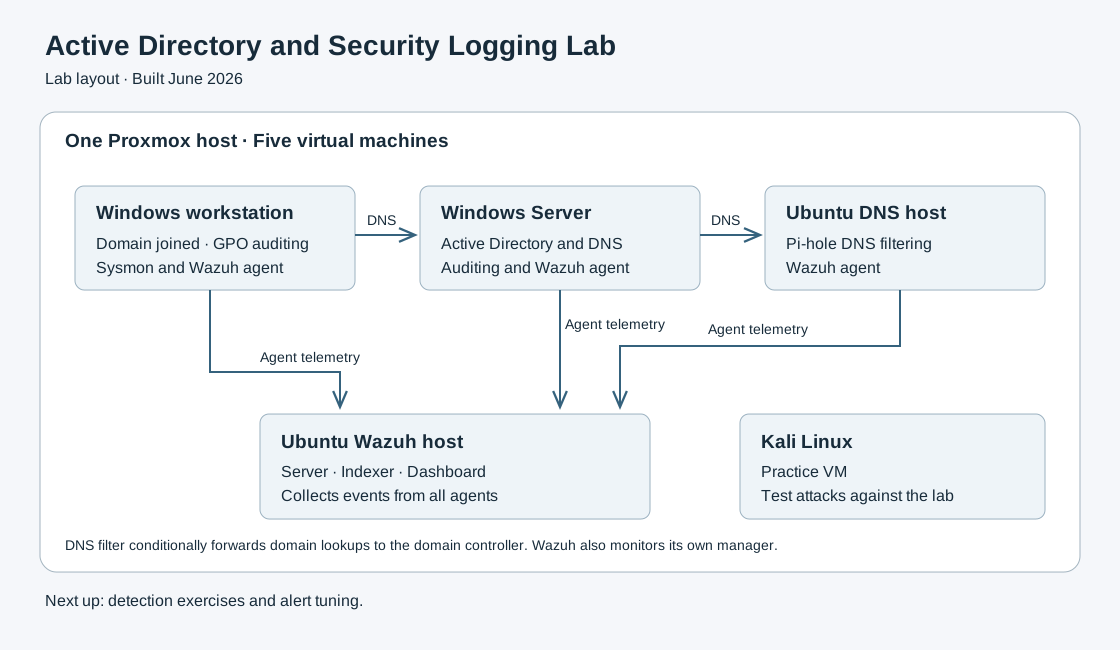
- Windows Server
- Active Directory Domain Services and DNS, with organizational units, users, and groups.
- Windows 11
- Domain-joined workstation with an audit baseline applied through Group Policy.
- Ubuntu DNS host
- Pi-hole DNS filtering and a Wazuh agent.
- Ubuntu Wazuh host
- Wazuh server, indexer, and dashboard for collecting events in one place.
- Kali Linux
- Set up for running test attacks against my own lab systems.
DNS
The domain controller answers DNS for the domain and forwards everything else to Pi-hole. Pi-hole uses conditional forwarding to send lookups for the domain back to the domain controller.
Logging
I turned on Windows audit policies, process-creation events with command lines, PowerShell logging, and Sysmon. A Group Policy linked to the workstation OU applies the audit settings to the workstation, and the domain controller's auditing is configured separately.
Wazuh agents run on the domain controller, the workstation, and the Ubuntu DNS host, and the Wazuh manager monitors itself. I confirmed that Windows Security, Sysmon, and PowerShell events were showing up in Wazuh.
Problems I ran into
- The workstation couldn't join the domain until I fixed which DNS server it was using.
- The Wazuh install stopped partway through because of a storage allocation problem on the Ubuntu VM, which I had to fix before it would finish.
What's next
Detection exercises: trigger a known event in the lab, follow it through the logs, and tune alerts based on what I find. After that, network segmentation and VPN access.